> ## Documentation Index
> Fetch the complete documentation index at: https://docs.inference.net/llms.txt
> Use this file to discover all available pages before exploring further.
# Launch a Training Run
> Start a training job from the dashboard — select your datasets, rubric, and recipe, then start training.
Once you have your [prerequisites](/platform/train/overview#prerequisites) ready, launching a training run takes a few minutes.
## Start a new job
Go to the **Training** tab in the dashboard and click **New Training Job**.
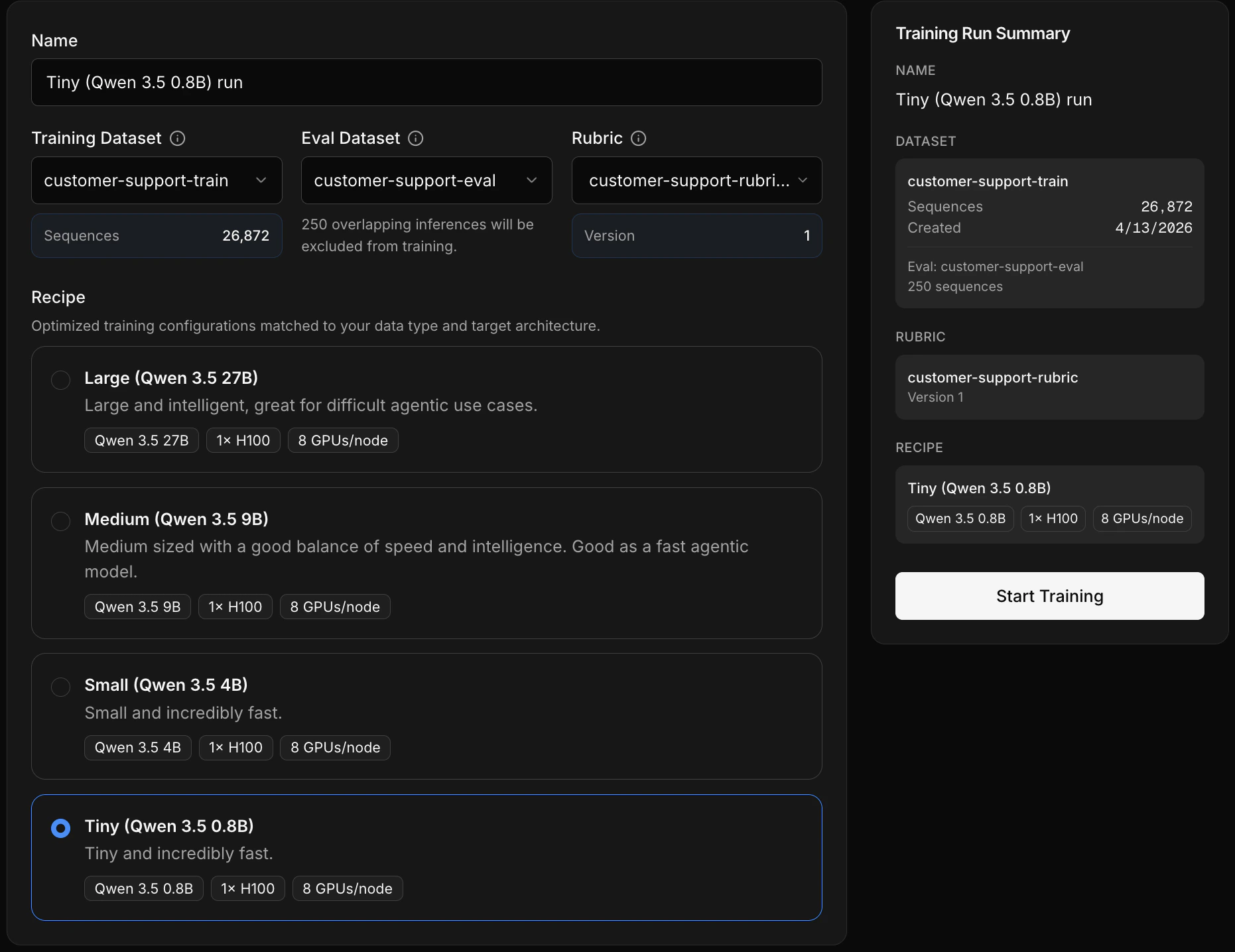 Choose the dataset the model will learn from. You can [build a dataset from live traffic](/platform/datasets/build-from-traffic), [upload a JSONL file](/platform/datasets/upload-a-dataset), or use [task tags](/platform/gateway/tasks) to filter captured traffic for clean, focused samples.
Choose the dataset used for [evaluations throughout training](/platform/train/mid-training-evals). Must have zero overlap with training data.
Choose the [rubric](/platform/eval/write-a-rubric) that defines your quality criteria. Make sure you've validated it against your eval dataset first.
Choose a [recipe](/platform/train/choose-a-recipe) based on task difficulty and capability needs.
Review your selections and click **Start Training** to queue the job.
## Training job lifecycle
Once started, your job moves through these statuses:
| Status | What's happening |
| ---------------------- | --------------------------------------------------------------------- |
| **Exporting datasets** | Your training and eval data is being prepared |
| **Queued** | Job is waiting for available compute |
| **Starting** | GPUs are being allocated and the training environment is initializing |
| **Running** | The model is actively training |
| **Completed** | Training finished successfully |
If something goes wrong, the job will show one of these:
| Status | What it means |
| ------------- | ------------------------------------------------------------------------------------------------------------- |
| **Failed** | Something went wrong — check the [logs](/platform/train/mid-training-evals#logs) on the training details page |
| **Cancelled** | The run was cancelled |
| **Timed out** | The run exceeded the maximum allowed duration |
Training can take anywhere from around 10 minutes to 10+ hours depending on dataset size and recipe. Once running, [monitor progress](/platform/train/mid-training-evals) from the training details page.
Choose the dataset the model will learn from. You can [build a dataset from live traffic](/platform/datasets/build-from-traffic), [upload a JSONL file](/platform/datasets/upload-a-dataset), or use [task tags](/platform/gateway/tasks) to filter captured traffic for clean, focused samples.
Choose the dataset used for [evaluations throughout training](/platform/train/mid-training-evals). Must have zero overlap with training data.
Choose the [rubric](/platform/eval/write-a-rubric) that defines your quality criteria. Make sure you've validated it against your eval dataset first.
Choose a [recipe](/platform/train/choose-a-recipe) based on task difficulty and capability needs.
Review your selections and click **Start Training** to queue the job.
## Training job lifecycle
Once started, your job moves through these statuses:
| Status | What's happening |
| ---------------------- | --------------------------------------------------------------------- |
| **Exporting datasets** | Your training and eval data is being prepared |
| **Queued** | Job is waiting for available compute |
| **Starting** | GPUs are being allocated and the training environment is initializing |
| **Running** | The model is actively training |
| **Completed** | Training finished successfully |
If something goes wrong, the job will show one of these:
| Status | What it means |
| ------------- | ------------------------------------------------------------------------------------------------------------- |
| **Failed** | Something went wrong — check the [logs](/platform/train/mid-training-evals#logs) on the training details page |
| **Cancelled** | The run was cancelled |
| **Timed out** | The run exceeded the maximum allowed duration |
Training can take anywhere from around 10 minutes to 10+ hours depending on dataset size and recipe. Once running, [monitor progress](/platform/train/mid-training-evals) from the training details page.