> ## Documentation Index
> Fetch the complete documentation index at: https://docs.inference.net/llms.txt
> Use this file to discover all available pages before exploring further.
# Metrics Explorer
> Dashboards for cost, latency, errors, and token usage across all your LLM calls.
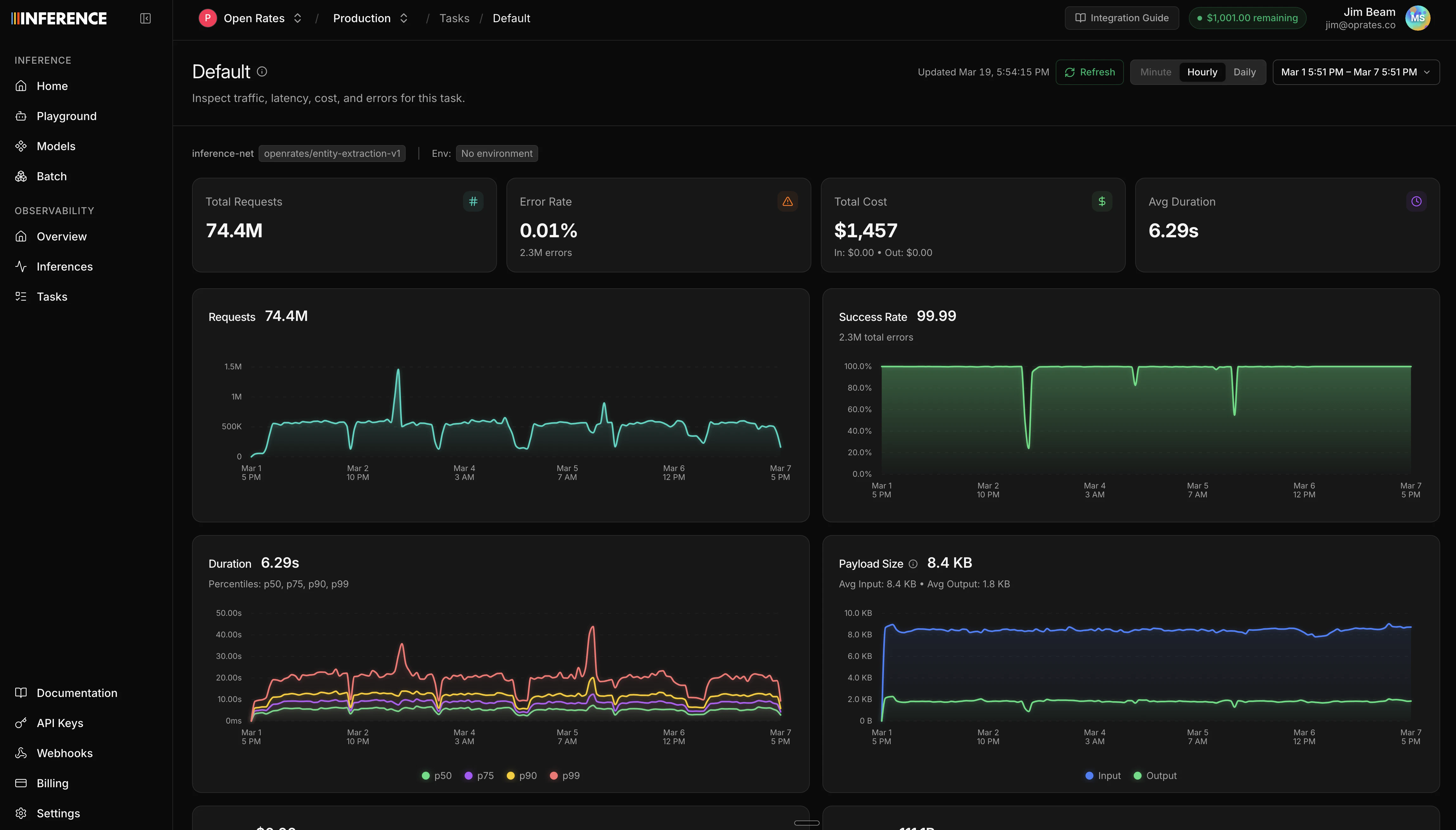
The Metrics Explorer gives you an at-a-glance view of your LLM usage. See trends, spot anomalies, and break down spending by model, task, or provider.
 ## Summary statistics
At the top of the dashboard, you'll see headline numbers for the selected time range:
* **Total inferences** and error count/rate
* **Total cost**, broken down by input, cached input, output, and reasoning tokens
* **Total tokens**, broken down by input (including cached) and output (including reasoning)
* **Average tokens per request** for both input and output
* **Streaming request count**
## Time series charts
Below the summary, time series charts show how your usage changes over time:
| Chart | What it shows |
| ----------------------- | ----------------------------------------------------------------- |
| **Requests** | Total request volume over time |
| **Error rate** | Success rate percentage over time |
| **Cost** | Cost breakdown over time (input, cached input, output, reasoning) |
| **Tokens** | Token usage breakdown over time |
| **Duration** | Latency percentiles (p50, p75, p90, p99) |
| **Time to first token** | TTFT percentiles (p50, p75, p90, p99), useful for streaming |
| **Payload size** | Average request and response sizes |
| **Peak throughput** | Peak requests per time bucket |
| **Model distribution** | Request count broken down by model |
## Breakdown charts
The dashboard also includes distribution views:
* **Model cost comparison** - which models are costing you the most
* **HTTP code breakdown** - distribution of status codes
* **Failures breakdown** - error types and frequency
* **Request types** - streaming vs non-streaming split
## Filtering
You can scope the dashboard to a specific slice of traffic using filters:
* **Task** - see metrics for a single task (requires [task tagging](/platform/gateway/tasks))
* **Model** - filter to a specific model
* **Provider** - filter by upstream provider
* **Environment** - filter by environment tag (production, staging, etc.)
* **Status** - filter by HTTP status code or range (2xx, 4xx, 5xx, specific codes)
## Time controls
* **Time range picker** - select the date range for the dashboard (default: last 24 hours)
* **Granularity selector** - control how data points are bucketed (hourly, daily, etc.)
## Next steps
Drill into individual LLM calls to inspect requests, responses, and errors.
Turn your traffic into datasets for evals and training.
## Summary statistics
At the top of the dashboard, you'll see headline numbers for the selected time range:
* **Total inferences** and error count/rate
* **Total cost**, broken down by input, cached input, output, and reasoning tokens
* **Total tokens**, broken down by input (including cached) and output (including reasoning)
* **Average tokens per request** for both input and output
* **Streaming request count**
## Time series charts
Below the summary, time series charts show how your usage changes over time:
| Chart | What it shows |
| ----------------------- | ----------------------------------------------------------------- |
| **Requests** | Total request volume over time |
| **Error rate** | Success rate percentage over time |
| **Cost** | Cost breakdown over time (input, cached input, output, reasoning) |
| **Tokens** | Token usage breakdown over time |
| **Duration** | Latency percentiles (p50, p75, p90, p99) |
| **Time to first token** | TTFT percentiles (p50, p75, p90, p99), useful for streaming |
| **Payload size** | Average request and response sizes |
| **Peak throughput** | Peak requests per time bucket |
| **Model distribution** | Request count broken down by model |
## Breakdown charts
The dashboard also includes distribution views:
* **Model cost comparison** - which models are costing you the most
* **HTTP code breakdown** - distribution of status codes
* **Failures breakdown** - error types and frequency
* **Request types** - streaming vs non-streaming split
## Filtering
You can scope the dashboard to a specific slice of traffic using filters:
* **Task** - see metrics for a single task (requires [task tagging](/platform/gateway/tasks))
* **Model** - filter to a specific model
* **Provider** - filter by upstream provider
* **Environment** - filter by environment tag (production, staging, etc.)
* **Status** - filter by HTTP status code or range (2xx, 4xx, 5xx, specific codes)
## Time controls
* **Time range picker** - select the date range for the dashboard (default: last 24 hours)
* **Granularity selector** - control how data points are bucketed (hourly, daily, etc.)
## Next steps
Drill into individual LLM calls to inspect requests, responses, and errors.
Turn your traffic into datasets for evals and training.